In January, @scottrobertson reported a bug for my browser extension, RedirectWeb.
The bug report was about an error, which was just from RedirectWeb’s logging. But what caught my eye was the user’s permission setting where the extension had been set to “Deny” for that website. This means Safari was still loading RedirectWeb’s content script on a page where the user had explicitly blocked it.
I confirmed this issue on my own Mac. I first tested it on Safari 26.2 on macOS, and as of Safari 26.4, it is still happening on both macOS and iOS.
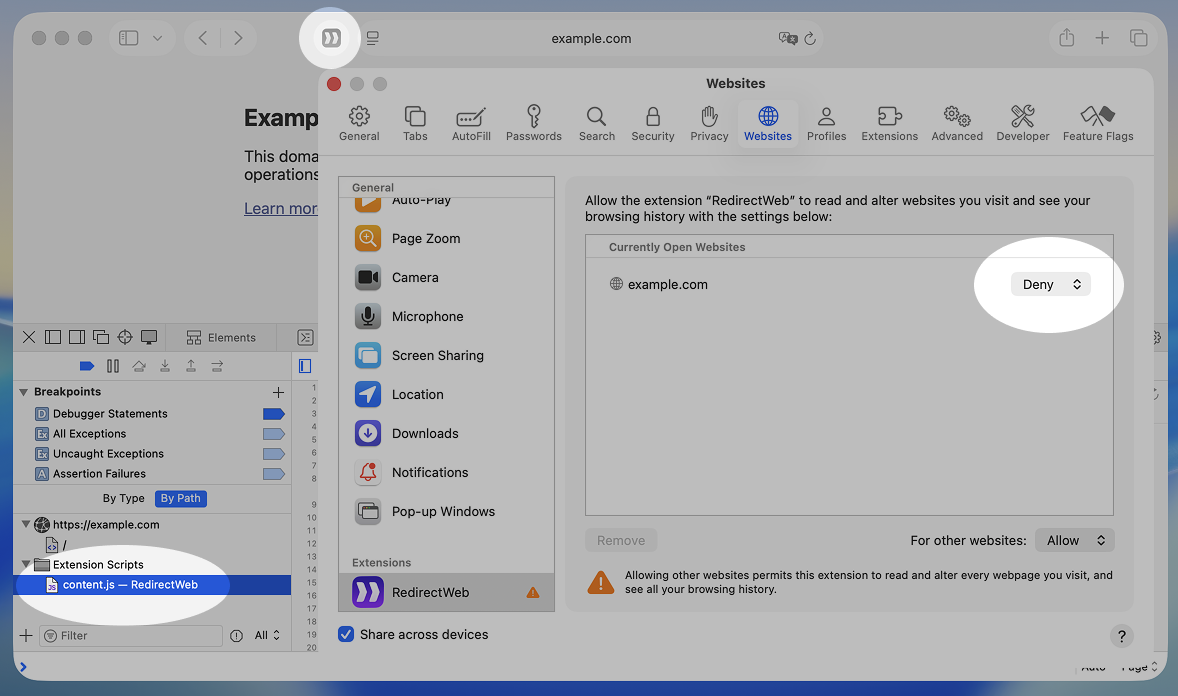
What makes this issue more concerning is that Safari’s UI makes it look like the extension is completely disabled. The toolbar icon is greyed out. So users think the extension isn’t running, but the content script is actually injected into the page.
This is what it actually look like:
I think this is a major privacy issue. If a user denies an extension on a sensitive website, like an online bank, they expect that extension’s code not to run at all. Safari shows that it is denied in the UI, but it doesn’t actually stop the script.
I reported this issue to Apple as FB21610178 but I have not received any response and it is still not fixed.
This issue might have a lower impact on iOS, because the UI makes it harder to set up a blacklisting approach (where you allow everywhere by default and block specific sites). But on macOS, you can easily set up this approach.
Safari’s per-site permission control is usually a great feature. In Firefox and Chrome, an extension’s content scripts are typically loaded on all domains listed in its manifest.json. Safari gives you an easy switch to manage this per site. But this bug breaks the trust in that feature.
So, if you currently use a blacklisting approach for Safari extensions, please be aware that your extensions might still be running. For sensitive websites, a safer approach is to use an whitelisting instead. Keep extensions disabled by default and only enable them on specific sites where you need them. Of course, if you trust an extension, keeping it enabled by default is fine. For RedirectWeb, I actually recommend users keeping it enabled everywhere for convenience.
I am writing it up here as an article since I believe there is little concern that it could be exploited as a zero-day in some form given its nature. I hope it will be useful for someone reading this.